PRESET AND CUSTOM WORKFLOWS

How Are Viral AI Tiny Desk Concert Videos Made?

Creators can build Tiny Desk-style AI videos with a preset band generator, a recorded driving performance, or a portrait animated by audio. The route you choose depends on whether you want a ready-made band remix or a custom performance you direct and edit yourself.

Make my video
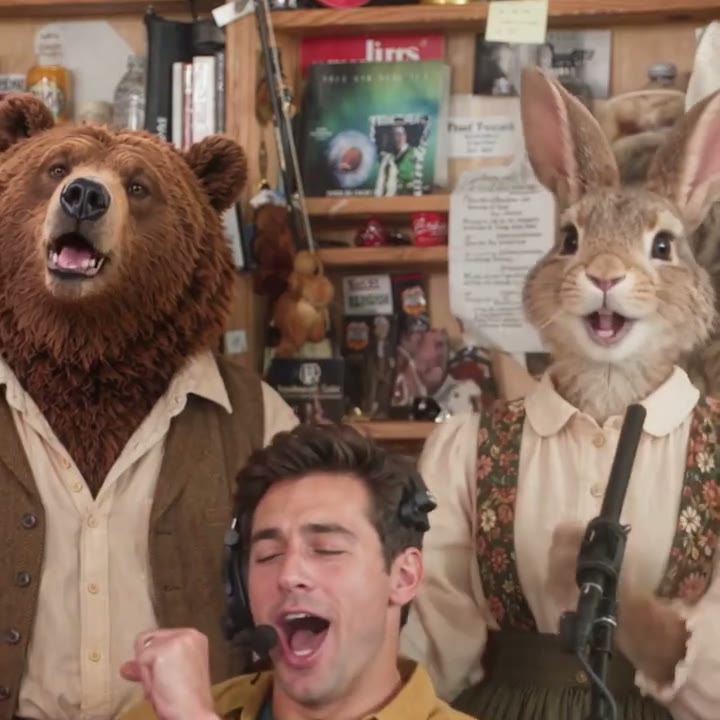
Band shot from an existing Outstand Studio generated video
A generated band scene from Outstand Studio.

Choose your starting point

Three routes from an idea to a performance.

Preset band generator

Start with your photos. Outstand Studio provides the concert setting, band roles, reference performance and matching audio. Choose your cast and video settings, then generate a short assembled clip.

Follow the photo-to-video walkthrough

Performance-driven character

Start with a recorded performance and a character reference. Tools such as Runway Act-Two transfer movement and expression to the character. Build individual performance shots, then assemble the sequence and soundtrack in your editor.

Explore Runway Act-Two

Audio-driven character

Start with a portrait and an audio track. Hedra Avatar documents singing and vocal performances; Kling Avatar accepts character images and audio with expression prompts. These are starting points for directing character shots within a custom production.

Explore Hedra Avatar

Inside the preset route

How Outstand Studio builds your band remix.

Your photos define the cast; the prepared reference supplies the scene and performance timing.

STEP 01

Give every performer an identity

Assign portraits to Lead, Keys, Back left, Back right and Sax. Start with yourself in one role, add consenting adult friends, or mix in pets and original characters. Keep any of the ready-to-use cast you want around you.

STEP 02

Use the prepared performance

The workflow combines the cast portraits with a prepared performance reference and matching audio. The reference guides the shot sequence, camera framing and role-specific movement; each assigned photo guides that performer’s appearance.

STEP 03

Choose the moment and frame

The 8-second option includes band and lead-vocal moments; the 15-second option continues to a saxophone close-up. Choose 9:16, 16:9, 3:4 or 4:3 at 720p, generate, and watch the finished take on your task page.

STEP 04

Finish with your personal touch

Download your video for sharing or further editing. To use your own music, replace the downloaded clip’s soundtrack in your preferred video editor and adjust the timing and volume. You can also add captions and a personal introduction.

Official tool documentation

Building blocks for a custom production.

The descriptions below summarize each provider’s documented inputs and controls. The proposed concert workflows are creative applications of those features.

Runway Act-Two

Input: a driving performance video plus a character image or video. Act-Two transfers motion, speech and expression; character-image inputs also offer hand and body gesture control. For a custom concert scene, record the movement you want for a character shot, then combine the generated shots in an editor.

Source: Runway performance-capture guide

Hedra Avatar

Input: a portrait image and an audio track. Hedra’s model overview documents lip-sync, facial motion, and singing or vocal performances. For an original-song project, begin with a short singer shot driven by your recording, then build the surrounding visual sequence.

Source: Hedra Avatar model overview

Kling Avatar

Input: a character image, audio and an expression prompt. Kling’s Avatar 2.0 guide describes dynamic character videos with expression and movement controls. This offers another way to explore an audio-led character performance before assembling your own concert edit.

Source: Kling Avatar user guide

Make your own version

Questions about the process.

How can I make an AI Tiny Desk video without editing skills?

+

Use a preset workflow such as Outstand Studio. Upload your photos, choose your band roles and select the length and format. The generator assembles the preset performance and matching audio into a downloadable video.

How is Outstand Studio different from Runway or Hedra?

+

Outstand Studio packages a prepared desk-session scene, five band roles and matching audio into a photo-upload workflow. Runway provides performance-transfer tools, while Hedra provides portrait-and-audio animation. Those routes give creators building blocks to direct and assemble their own production.

How can I use my own song?

+

For your Outstand Studio clip, download the video and replace the soundtrack in your favorite video editor. Adjust the audio timing and volume to suit your song. For an audio-driven character production, explore the Hedra workflow described above.

Where can I learn about the trend and cast roles?

+

Read the Tiny Desk AI trend explained, explore the cast and prompt template, or follow the photo-to-video tutorial to prepare your first session.